
12.3-Inch KNX Touch Control Panel
Wide-Screen Control for Premium KNX Spaces
The DERVIRGA KTP-12 is a 12.3-inch KNX touch control panel for centralized control in luxury villas, premium apartments and high-end commercial buildings. Its 1920 × 720 IPS multi-touch display provides a wide visual interface for lighting, curtains, HVAC and scene control.
Designed for professional KNX building automation, the KTP-12 supports up to 256 lighting channels, 32 curtain channels, 32 HVAC channels and 128 scenes. Available functions depend on ETS configuration and connected KNX equipment.
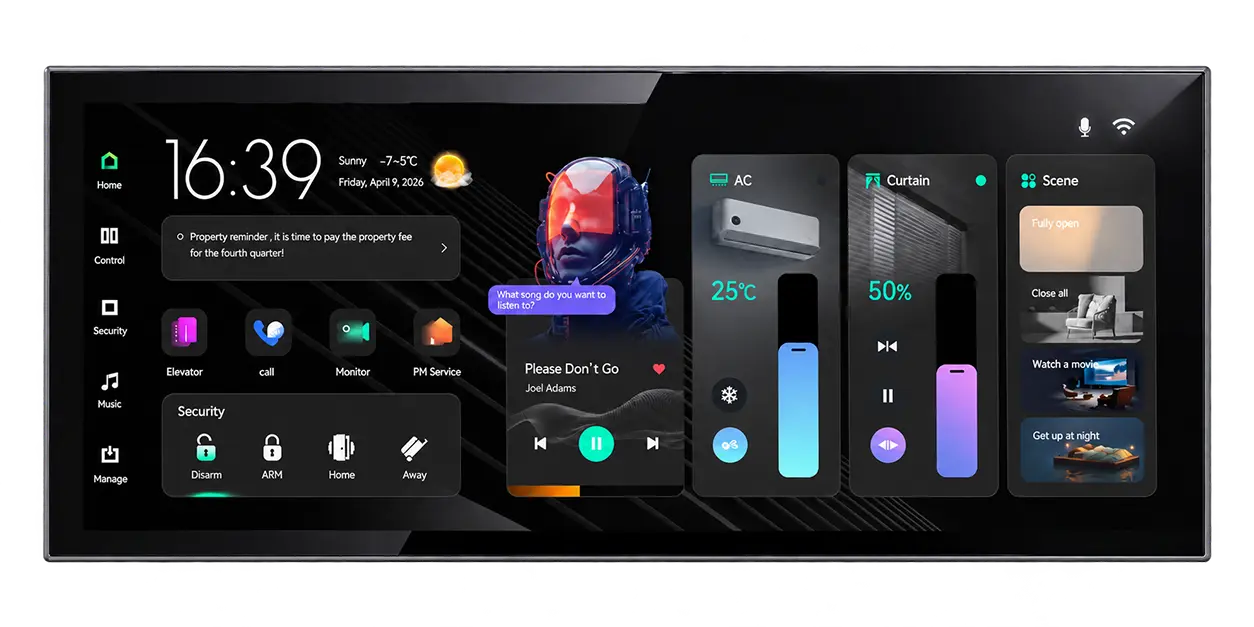
A wide-screen KNX control interface for premium residential and commercial buildings.
Wide-Screen Visualization for KNX Building Control
The DERVIRGA KTP-12 brings lighting, curtain, HVAC and scene controls together on a 12.3-inch KNX touchscreen. Its wide-format display helps project teams organize connected functions into a clear visual interface for larger residential and commercial spaces.
12.3-Inch IPS Multi-Touch Display
With a 1920 × 720 IPS display, the KTP-12 offers a spacious touchscreen layout for viewing and operating configured KNX functions. Lighting, shading, climate and room scenes can be presented through a common interface, according to the project design and connected equipment.
Interface availability and operating behavior depend on the ETS application configuration and the selected KNX devices.
Wide-Screen Interaction
The 12.3-inch IPS multi-touch display provides space for coordinated control pages and quick access to configured KNX functions.
Lighting & Scene Control
Bring lighting groups and scene selection into one visual control point, with actions assigned to compatible KNX equipment.
Curtains & Climate
Present curtain, shading and HVAC controls in the same on-screen environment, based on the devices integrated into the KNX project.
ETS-Based Integration
Plan individual functions and group addresses through ETS, then verify operation with the connected KNX actuators and controllers.
A Larger Interface for Premium Spaces
The KTP-12 is intended for KNX installations in luxury villas, premium apartments and high-end commercial buildings. Available controls depend on the selected KNX devices and project configuration.
Lighting, Shading & HVAC Control
Control lighting, curtains and climate functions from the DERVIRGA KTP-12 wide-screen KNX interface. Plan each function around the installed actuators, room requirements and ETS application configuration.
Lighting Control
Configure on/off switching, dimming, tunable-white and RGB/RGBW lighting functions across residential or commercial zones with compatible KNX devices.
Curtain & Shading Control
Operate compatible curtains and Venetian blinds through KNX group objects, including opening, closing, positioning and supported slat-angle control.
HVAC & Climate Control
Bring supported air-conditioning, underfloor-heating and fresh-air control functions into a coordinated touch interface using the selected KNX HVAC equipment.
Coordinate Room Functions Through ETS
The KTP-12 acts as a wide-screen control interface within a KNX building automation system. Specify the required lighting, shading and HVAC devices, assign group addresses and test the configured functions during commissioning.
The KTP-12 supports up to 256 lighting channels, 32 curtain channels and 32 HVAC channels. Actual functions depend on the ETS application, connected equipment and project configuration.
KNX Scene Management for Connected Rooms
Bring lighting, curtains and climate controls together through KNX scenes on the KTP-12 wide-screen interface. Each scene can be planned around the routines, zones and connected systems in premium residential and commercial buildings.
Plan Up to 128 KNX Scenes
The DERVIRGA KTP-12 supports up to 128 KNX scenes. System integrators can organize coordinated lighting, shading and HVAC actions to match the requirements of a luxury villa, premium apartment or high-end commercial space.
Define the Scene
Identify the lighting, curtain and climate actions to combine in each scene according to the room or zone requirements.
Coordinate KNX Devices
Map the intended scene to connected actuators and the available lighting, curtain or climate interfaces.
Plan Touchscreen Access
Place commonly used scenes on the wide-screen interface for convenient access across relevant spaces.
Configure & Test
Check each group address and verify scene behavior in the applicable ETS application with the connected KNX devices.
Scene Control for Premium Spaces
Luxury Villas
Plan arrival, entertainment and evening scenes across living areas.
Premium Apartments
Coordinate daily room settings across residential spaces.
High-End Commercial Buildings
Configure scene actions for reception, shared areas and meeting spaces.
Scene capacity and control behavior depend on the KTP-12 ETS configuration, connected KNX devices and project integration.
KNX Power, Wiring & Installation Planning
Review the KTP-12 power and wiring requirements before installation. The KNX bus connection and auxiliary DC supply have separate roles in the system; the installation plan should account for both connections and the standard EU back box.
Two Connections for KNX Control
The KTP-12 uses a 24 V KNX bus connection for communication and a separate 12–36 V DC auxiliary power supply. Both connections must be correctly installed to support reliable KNX operation.
Ensure the KNX bus and auxiliary DC power connections are correctly wired before installation and commissioning.
EU Back Box
Designed for installation with a standard EU back box, with sufficient space for secure mounting and cable routing.
ETS Project
Plan KNX group addresses, functions and commissioning with the applicable ETS project.
326 × 143.5 mm
Device width and height; body depth is 11.5 mm excluding the back box.
Before Power-On
Verify terminal connections, supply voltage and polarity before powering on the device.
Prepare the Site Before Connecting the Panel
Plan the KNX bus connection, auxiliary DC power supply, EU back-box installation and cable routing before proceeding with ETS configuration and commissioning.
The KTP-12 body thickness is 11.5 mm, excluding the rear housing. Allow sufficient clearance for mounting, rear housing and cable routing at the installation site.
12.3-Inch KNX Touch Control for Premium Buildings
The DERVIRGA KTP-12 brings a wide-screen KNX control interface to luxury villas, premium apartments and high-end commercial buildings. Project teams can organize lighting, curtains, HVAC and scenes around the needs of each space and its connected KNX system.
Luxury Villas
Bring KNX lighting, curtain, climate and scene controls into one wide-screen interface for living rooms, entertainment spaces and other villa areas.
Premium Apartments
Provide a coordinated touchscreen experience for premium apartment interiors, with room functions selected according to the development requirements and KNX configuration.
High-End Commercial Buildings
Plan large-format visual control for reception areas, executive meeting rooms and shared commercial spaces with compatible KNX building equipment.
Plan the Interface Around Each Space
For premium residential and commercial projects, define the intended room functions, identify compatible KNX equipment and coordinate touchscreen layouts and ETS configuration before commissioning.
The KTP-12 provides a KNX touchscreen interface for selected building-control functions. Actual capabilities and scene behavior depend on the applicable ETS configuration and connected KNX devices.
KTP-12 Dimensions & Installation Planning
Plan the KTP-12 wide-screen panel location and mounting requirements for KNX control in luxury villas, premium apartments and high-end commercial buildings. Allow sufficient wall space for the panel, check EU back-box compatibility and provide clearance for the rear housing and cables.
Plan the Wide-Screen Touchscreen Location
Allow for the wider 12.3-inch landscape panel when coordinating wall finishes, accessible viewing positions and nearby architectural details.
*The 11.5 mm body thickness excludes the rear housing/back box. It must not be interpreted as the total installed depth.
Plan wide-screen placement
Choose a convenient viewing height and allow sufficient horizontal wall space for the 326 mm-wide front panel.
Check the EU back-box arrangement
The KTP-12 is designed for installation with a standard EU back box. Check the mounting points, secure fixing arrangement and sufficient clearance for the rear housing and cable routing.
Plan KNX and auxiliary DC wiring
Provide a 24 V KNX bus connection and a separate 12–36 V DC auxiliary power supply. Verify the terminal connections, polarity and safe cable routing before powering on the device.
Verify before commissioning
Check power connections, polarity, cable clearances and the ETS project parameters before the final installation and commissioning.
Prepare the Wide-Screen Installation
For premium residential and commercial projects, coordinate the wall location, EU back-box mounting, rear housing clearance and cable routing with the architectural and electrical installation.
The KTP-12 measures 326 × 143.5 × 11.5 mm, excluding the rear housing. Allow for the full installation depth, secure mounting points and cable clearance when preparing the wall installation.
KNX System Integration & Project FAQ
Explore the key integration requirements for the DERVIRGA KTP-12 12.3-inch KNX touch control panel, including power connections, control capacity, ETS configuration and wall-mounting coordination.
Four Checks for a 12.3-Inch KNX Touchscreen Project
Plan the KTP-12 wide-screen interface around KNX project requirements, the connected equipment and the installation site.
Confirm bus and auxiliary power
Provide a 24 V KNX bus connection and a separate 12–36 V DC auxiliary power supply. Verify all terminal connections before powering on the panel.
Define compatible KNX control functions
Match the required lighting, curtains, HVAC and scenes to the installed KNX actuators and other relevant control devices.
Prepare the ETS configuration
Assign the device physical address, application parameters and group addresses using the appropriate KTP-12 ETS application data.
Verify the wall box and commissioning
Ensure the EU back box provides sufficient space for the rear housing and cable routing. Test all configured KNX control functions before handover.
Complete the installation, power connections and ETS configuration before verifying the panel’s operation with the connected KNX devices.
KTP-12 KNX Touch Control Panel FAQ
What can the KTP-12 control in a KNX building?
The KTP-12 provides a 12.3-inch multi-touch interface for configured lighting, curtains, HVAC and scene functions. Available controls depend on compatible KNX devices and the ETS project configuration.
How many lighting, curtain, HVAC and scene channels are supported?
The KTP-12 supports up to 256 lighting channels, 32 curtain channels, 32 HVAC channels and 128 scenes. Available functions depend on the ETS configuration and connected KNX devices.
What power supply does the KTP-12 require?
The KTP-12 requires a 24 V KNX bus connection and a separate 12–36 V DC auxiliary power supply. Ensure both connections are correctly planned and wired before powering on the device.
How is the KTP-12 configured for a KNX project?
KNX physical addressing and application parameters are configured through ETS. Confirm the applicable ETS data, communication objects and group addresses, then test each function with the connected devices.
What are the KTP-12 dimensions and mounting requirements?
The KTP-12 measures 326 × 143.5 × 11.5 mm, excluding the rear housing, and is designed for installation with a standard EU back box. Allow sufficient space for the rear housing, cable routing and secure mounting.
What to Share with DERVIRGA
Share your project type (luxury villa, premium apartment or high-end commercial building), expected KTP-12 quantity, requested lighting and HVAC functions, destination market, power and wall-box requirements, and any questions about ETS integration. This helps DERVIRGA discuss the right technical information for your project.
Available control functions depend on the ETS configuration and connected KNX equipment. Installation requirements should be considered according to the project’s mounting conditions.
Request KTP-12 Technical Resources
Request KTP-12 product specifications, installation details, KNX wiring information and ETS integration support for your luxury villa, premium apartment or high-end commercial project.
Need Technical Assistance?
Share your project type, planned KTP-12 quantity, destination market and KNX integration requirements. Our team can help with product selection, power connections and project coordination.
Model-specific power and installation requirements
12.3-inch IPS multi-touch display and KNX functions
ETS application settings and KNX project integration
Include KTP-12, your project application, estimated quantity, destination market and the information you require.
Technical Resources
Explore the KTP-12 12.3-inch IPS display, 1920 × 720 resolution, electrical supply and control functions.
Plan the EU back box, rear-housing clearance and mounting arrangement for the 326 × 143.5 mm front panel.
Review the 24 V KNX bus connection and separate DC 12–36 V auxiliary supply requirements.
Review body dimensions of 326 × 143.5 × 11.5 mm, excluding the rear housing, for installation planning.
Discuss ETS configuration, group addresses, KNX control functions and integration requirements.
KTP-12 control functions depend on ETS configuration and connected KNX devices. Confirm power connections, mounting clearance and project compatibility before installation.
Plan Your 12.3-Inch KNX Touch Panel Project with DERVIRGA
Planning KNX control for a luxury villa, premium apartment or high-end commercial building? The DERVIRGA KTP-12 brings lighting, curtains, HVAC and scene control into a 12.3-inch widescreen interface. Share your project scope, KNX integration requirements and estimated quantity to discuss product selection and quotation options.
Product & Project Fit
Discuss your building application, intended KTP-12 quantity, widescreen control locations and installation requirements.
KNX Project Coordination
Outline the lighting, shading, climate and scene functions, connected KNX devices, power supplies and ETS integration requirements.
OEM / ODM Project Consultation
Share branding, appearance or project-specific integration requests so our team can discuss available options and technical feasibility.
Include KTP-12, your project application, estimated quantity, destination market and intended KNX functions when contacting us.
Prepare Your Project Brief
A few project details help our team provide relevant product information and quotation support.
Project application
Luxury villas, premium apartments or high-end commercial buildings
Quantity & destination
Estimated KTP-12 quantity, project schedule and destination market
Control interface
12.3-inch widescreen placement; lighting, curtains, HVAC and scene-control requirements
Project-specific requirements
Wall location, rear clearance, KNX integration or project-specific branding requests
12.3-inch KNX touch control panel with 1920 × 720 IPS multi-touch display